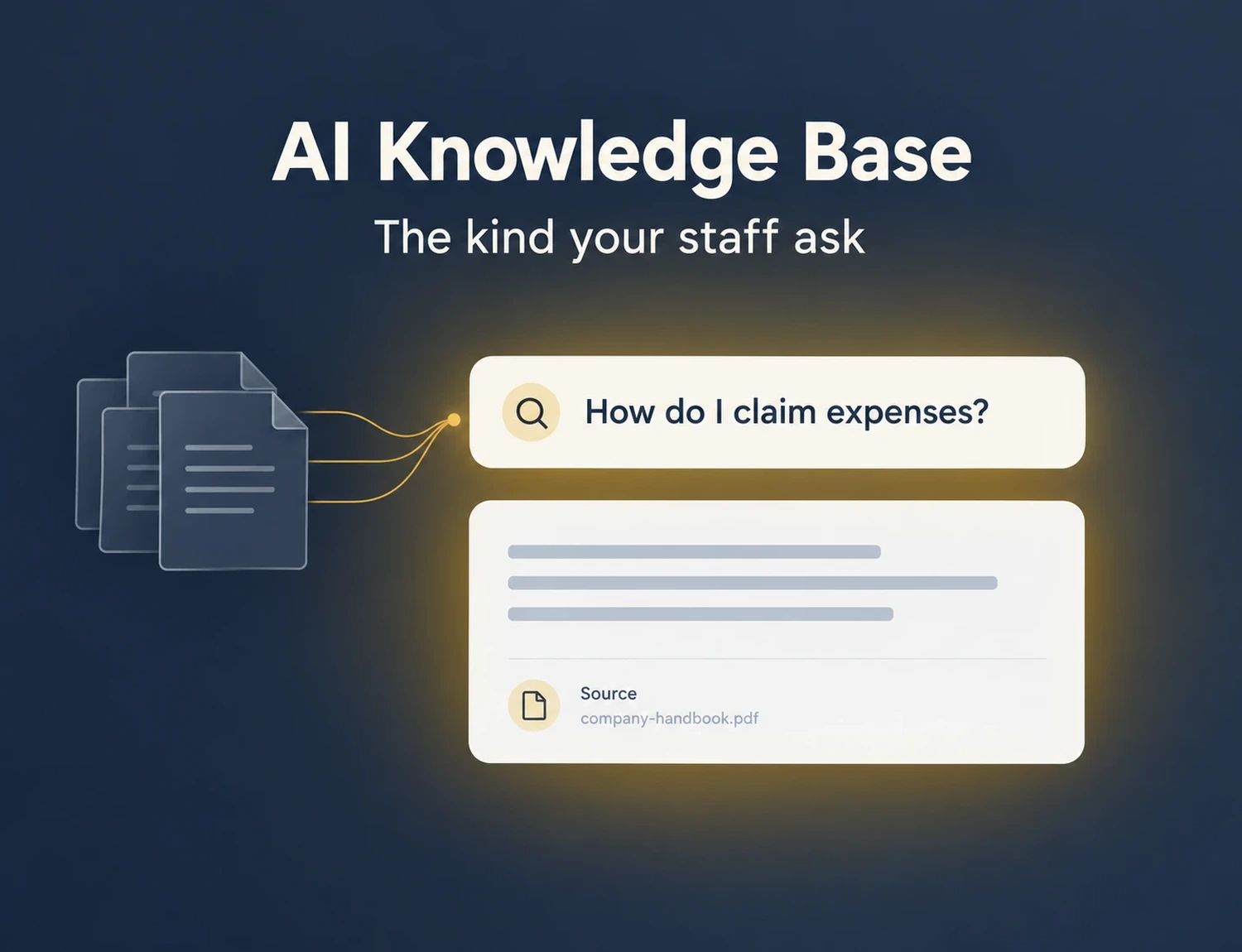
TL;DR: An AI knowledge base answers a question in plain language from your organisation’s own content, and shows where the answer came from. Most guides describe the kind your customers use. This one covers the kind your staff ask, because 47% of digital workers struggle to find the information they need for their jobs (Gartner, 2023).
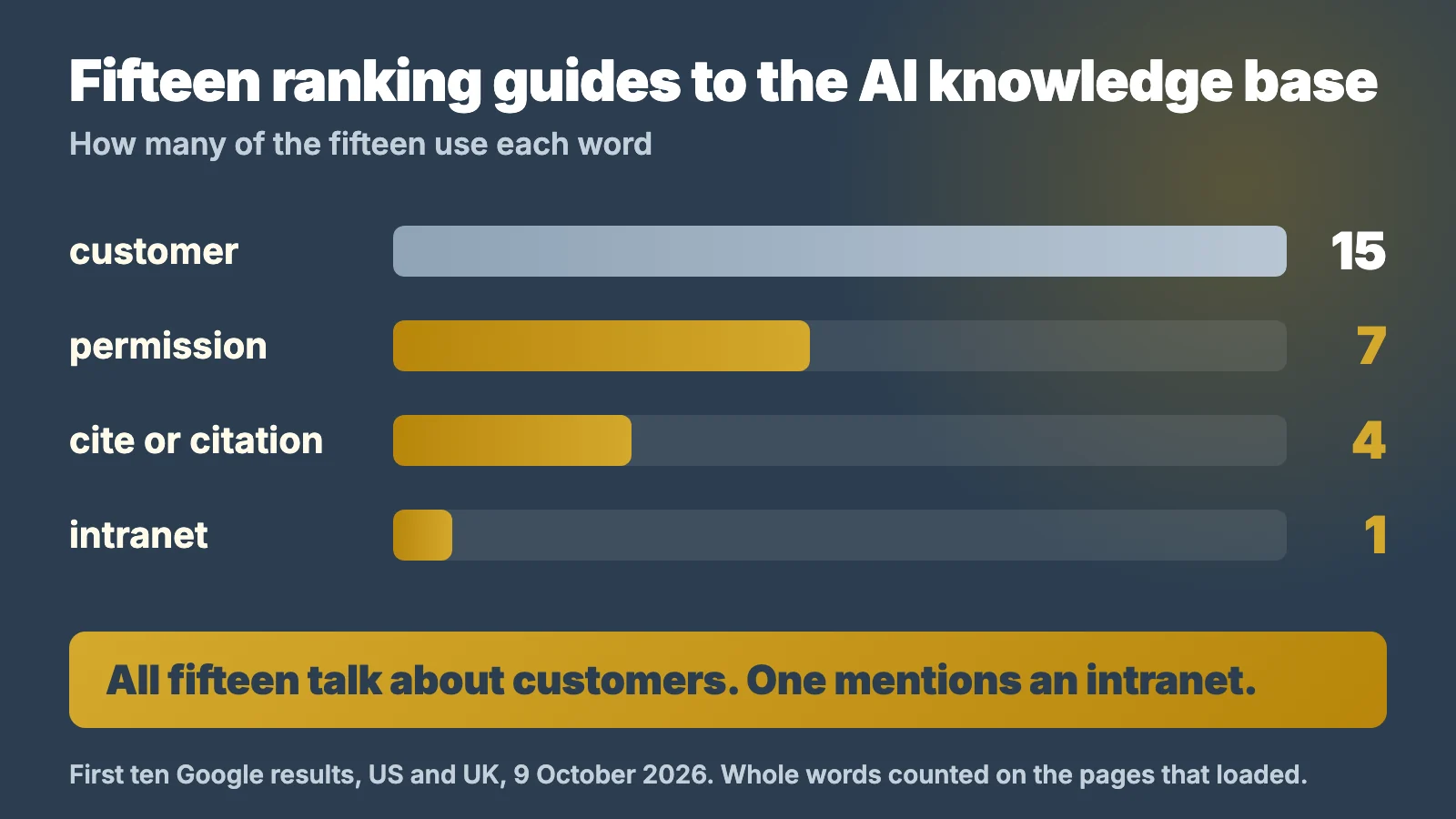
Before writing this, I read the pages Google ranks first for “AI knowledge base” in the US and the UK. Fifteen of them loaded. Every one talks about customers: support tickets, help centres, agents. One uses the word “intranet”. Eight never use the word “permission”. If you want this for your own staff, those guides were written for someone else.
Key Takeaways
- An AI knowledge base answers questions from your organisation’s own content and links the source, instead of returning a list of documents.
- There are three kinds: one your customers ask, one your staff ask, and one a person builds for themselves. Most guides only describe the first.
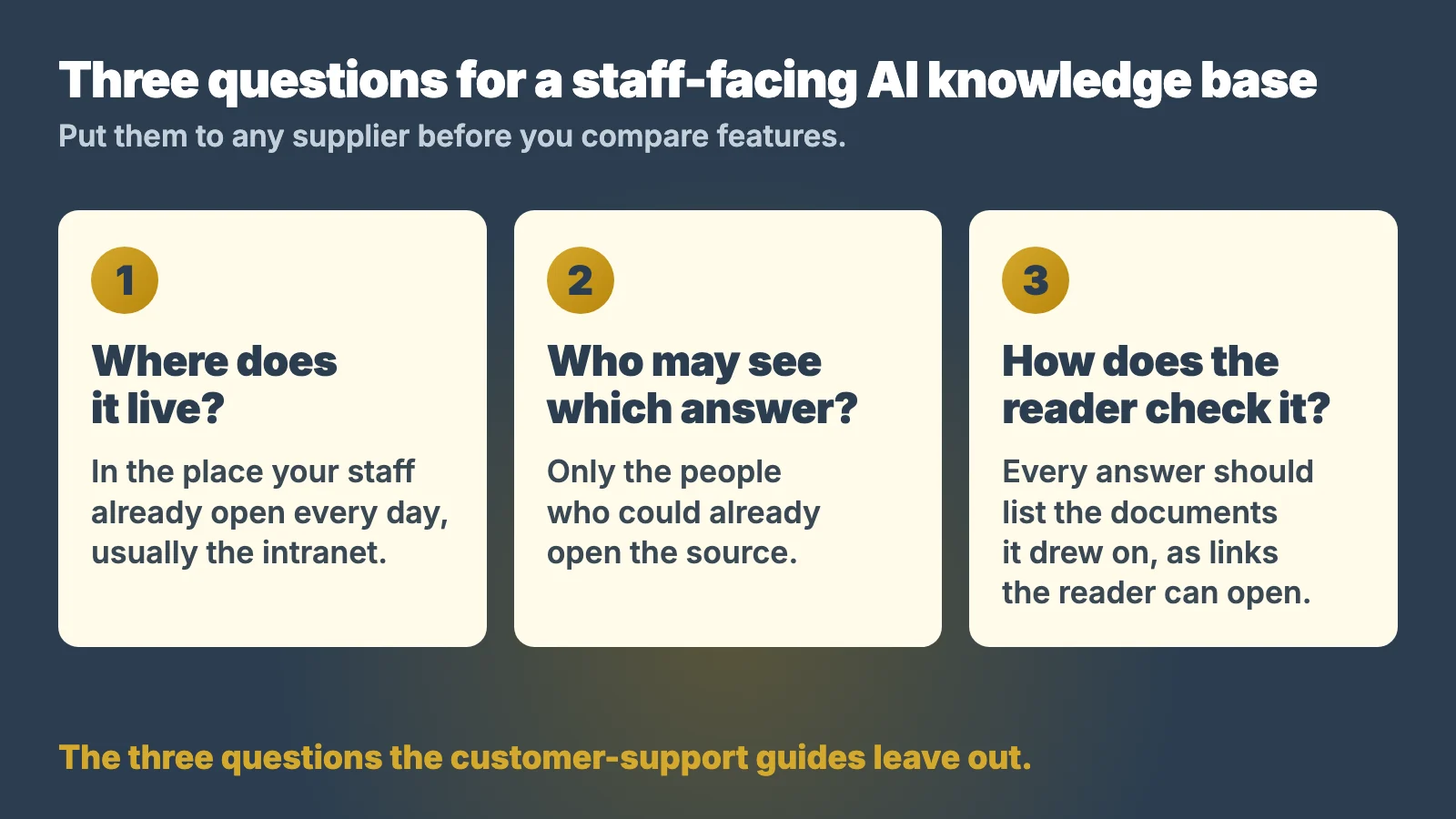
- For the staff-facing kind, three questions matter more than features: where it lives, who may see which answer, and how the reader checks it.
- People act on AI answers without checking. A global study of AI at work found that many rely on AI output without evaluating its accuracy: 66% (KPMG and the University of Melbourne, 2025).
- The best home for a staff-facing one is usually the intranet people already open, not another app.
Three questions to answer before you add AI
The three-question check
Answer for how your organisation works today. It shows where to start before any AI is switched on.
Nothing is sent anywhere. If all three are already in place, it says so.
What is an AI knowledge base?
An AI knowledge base is a store of your organisation’s own content that people can question in plain language. Instead of a list of links, it gives a written answer and points to the documents it used. The content is the same policies, procedures and how-to articles a classic knowledge base holds. What changes is how people get at it.
A classic knowledge base makes the reader do the work: you guess the right keyword, open three articles and piece the answer together yourself. An AI knowledge base does that reading for you, then shows its working.
That is the definition every ranking guide agrees on, and it is right. Where those guides stop is the question of who is asking. That turns out to change almost everything about how you should set one up.
How does an AI knowledge base work?
It works in two steps: find, then answer. When someone asks a question, the system first searches your content for the passages most likely to hold the answer. It then writes a reply from those passages and lists them as sources.
The usual name for this is retrieval augmented generation, or RAG. It means AI that looks up your own content first, writes its answer from what it found and attaches the source.
Here is an example. A new starter types “How do I claim expenses?” A classic knowledge base returns four articles with “expenses” in the title. An AI knowledge base replies that claims go on the Expense Claim form within 30 days, with a photo of each receipt, and names the finance article it took that from. The starter acts on the answer, and can open the article if anything looks wrong.
Two things follow from that design. First, the answer can only be as good as the content behind it. Second, the source list is not decoration: it is how a reader checks the answer before acting on it.
This is also why interest has moved so fast. In 2024, 78% of organisations reported using AI, up from 55% the year before (Stanford HAI, AI Index 2025). Pointing that AI at your own documents is the obvious next step. It is also safer than staff pasting company documents into public tools, the habit an AI usage policy exists to govern.
Why do most guides to the AI knowledge base talk about customers?
Because most of the companies ranking for the term sell customer support software. I read fifteen of the pages in Google’s first ten results, in the US and the UK, on 9 October 2026. Fin, Zendesk, Help Scout, Salesforce, Stonly and Decagon are among them. Their product answers customers, so their definition does too.
The numbers are stark. The word “customer” appears on all fifteen pages, 574 times in total. “Intranet” appears on one. Eight of the fifteen never use the word “permission”. Eleven never use “cite” or “citation”.
None of that makes those guides wrong. An AI knowledge base that deflects support tickets is a real and useful thing. It does mean the questions a staff-facing one raises go unasked. Who may see which answer? How does a member of staff check it? Where should it sit? The rest of this guide takes those in turn.
The three kinds of AI knowledge base
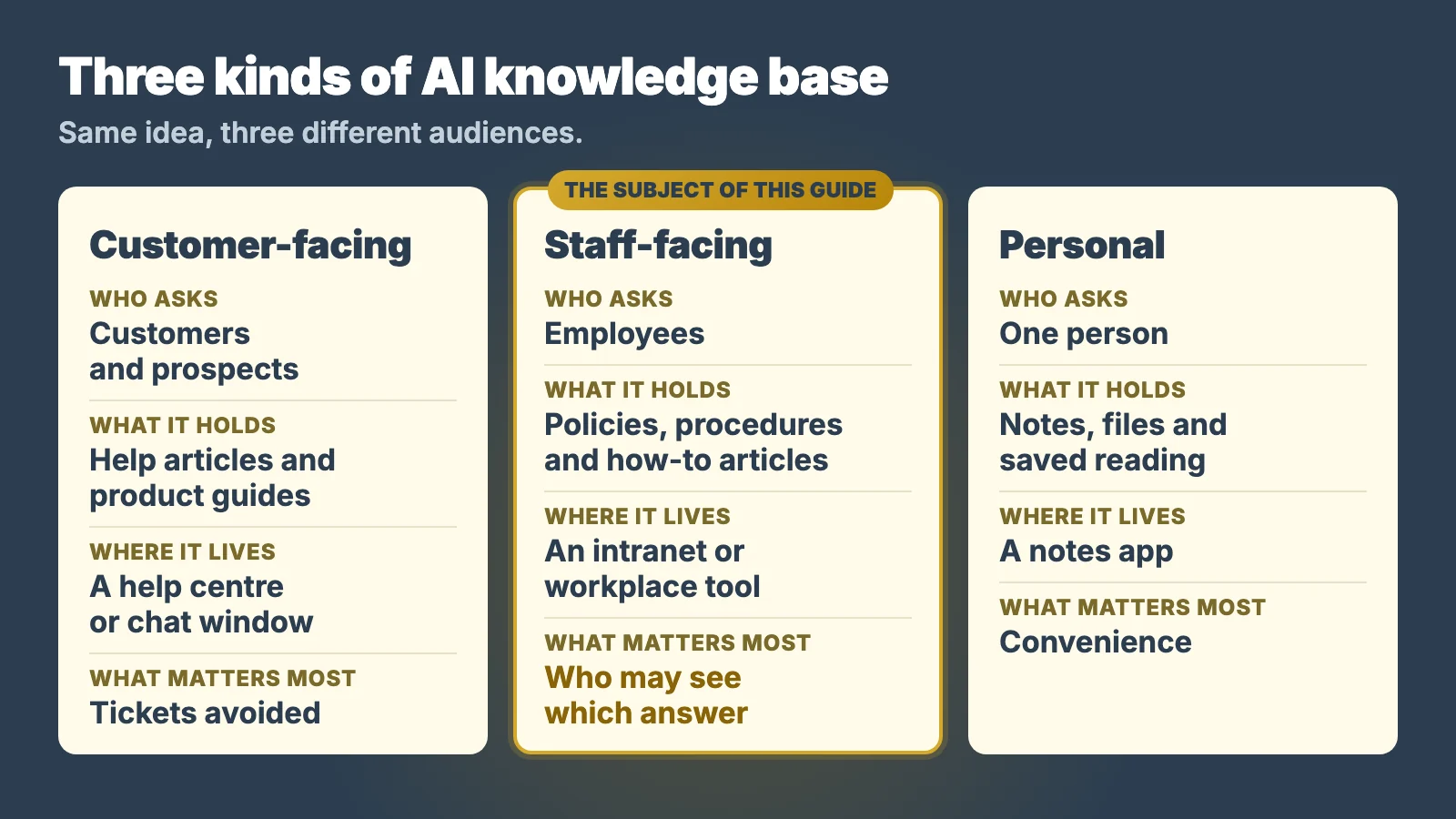
The term covers three different things. It helps to know which one you mean before you compare anything.
| Customer-facing | Staff-facing | Personal | |
|---|---|---|---|
| Who asks | Customers and prospects | Employees | One person |
| What it holds | Help articles and product guides | Policies, procedures and how-to articles | Notes, files and saved reading |
| Where it lives | A help centre or chat window | An intranet or workplace tool | A notes app |
| What matters most | Tickets avoided | Who may see which answer | Convenience |
| Who owns the content | The support team | Each department | The individual |
Most guides describe the customer-facing kind. The personal kind explains why Google’s related searches for the term include open-source tools and note-taking apps. The staff-facing kind is the subject here, and it is the least written about.
It is also the one with the hardest rules, because a customer help centre is public by design and a staff knowledge base is not. It can hold pay bands, disciplinary procedures and board papers next to the canteen menu.
How is an AI knowledge base different from a chatbot or enterprise search?
These terms overlap, and people mix them up. Google’s own “People also ask” box for this term includes “Does ChatGPT have a knowledge base?” The short answer is that a chatbot is the window you type into, and a knowledge base is the content behind it. Here is how the terms line up.
- A help centre is a published set of articles for customers. It may or may not have AI on top.
- A chatbot is the window you type into. With nothing behind it, a chatbot answers from general training, not from your documents.
- Enterprise search finds documents across your systems and returns a list. You still read them yourself.
- An AI knowledge base is the content plus the answering layer. It reads your documents and replies with sources.
In practice the lines blur. An enterprise search product can add an answering layer, and a help centre can add a chatbot. What matters is whether the answer comes from your own content, and whether you can see which content.
Where should a staff-facing AI knowledge base live?
In the place your staff already open every day. For most organisations that is the intranet at the centre of a digital workplace, not a new application.
The reason is simple arithmetic. In Gartner’s survey of digital workers, fielded in late 2022, the average desk worker used 11 applications, against six in 2019. Each new tool is one more login, one more place to check and one more thing to forget. A knowledge base nobody opens answers nothing. It is the same reason intranet projects stall after launch.
I managed Claromentis for seven years at a multinational healthcare group, with 850+ active users across 20 countries. The most common support ticket was some version of “I can’t find the document”. A knowledge base in a system people never opened would not have closed one of those tickets.
So start from where people already are. If the intranet holds the policies, the staff directory and the news, the answers belong there too. We found the same pattern when we looked at employee self-service. Further down, the section on what it looks like in practice shows the one we implement.
Who gets to see which answer?
Only the people who could already open the source. That is the rule a staff-facing AI knowledge base has to keep. Eight of the fifteen guides I read never use the word “permission”.
A customer help centre has one audience, and everything in it is public. Your internal content is the opposite. A finance procedure, a salary review and a first-aid guide can sit in one library, each with a different audience.
So ask any supplier a plain question. When two people in different roles ask the same thing, does each get an answer drawn only from what they may see? If the reply is vague, stop there.
Permissions are also where most of the preparation goes, because AI does not create access: it makes existing access much easier to use. Our guide to the AI-powered intranet covers that risk, and a test for whether you need AI yet.
How do you know the answer is right?
You check the source, and a good AI knowledge base makes that a single click. Every answer should list the documents it drew on, as links the reader can open.
This matters because people rarely check on their own. A 2025 study surveyed more than 48,000 people in 47 countries. On AI at work, it found that many rely on AI output without evaluating its accuracy (66%) and are making mistakes in their work because of AI (56%) (KPMG and the University of Melbourne, 2025).
A visible source changes that habit. The reader can see which document the answer came from and judge it for themselves.
Of the fifteen guides I read, eleven never use the words “cite” or “citation”. For a customer chatbot that may be fine. For an answer a member of staff will act on, the source is the feature.
What goes into a staff knowledge base
The same content a good knowledge base always held. AI does not change what belongs there, only how much its quality shows. Most of it falls into three groups.
- Rules people must follow. Policies and procedures: leave, expenses, health and safety, data protection.
- How-to articles. How to book a room, request equipment or raise a purchase order.
- Reference. Who does what, where to find a form, what an internal term means.
Two habits of shape help. Write each article for a question, so “How do I claim expenses?” beats “Finance Procedure 14”. Keep each article to one subject, because a short article on one task is easier to check than a forty-page handbook.
Keeping that content current is its own job. It needs named owners and a routine, and it deserves more than a paragraph here. The short version: an AI knowledge base repeats what it is given, so somebody has to own what it is given.
What does a staff-facing AI knowledge base look like in practice?
Here is the one we implement, as an example of the built-in kind. Claromentis is an intranet platform, and version 11 added AI search, AI overviews and an AI assistant. All three work from the content inside your own intranet.
A few details show how the three questions above get answered. According to Claromentis’s own page on AI search, AI overviews cite the intranet content they came from, with links. Search results and overviews follow the intranet’s permissions, by role, team, location or group. Administrators can switch AI search and overviews on or off.
The knowledge base itself is one of the applications an intranet carries. Articles can be organised by team, department or office location, and staff can subscribe to them and endorse them.
Inside Claromentis: ask a question, see the answer and its source
 Ask anything
12
Ask anything
12
The Knowledge Base list of articles
Who signs off overtime?
1 • 6 October 2026
Can I book the pool car?
2 • 29 September 2026
Where is the fire log kept?
1 • 22 September 2026
Search with an AI Overview and its source
Claim within 30 days of the spend on the Expense Claim form, with a photo of each receipt. Claims your line manager approves before the 20th are paid with that month's salary.
Knowledge BaseThe article the answer links to
Expenses: what you can claim and when Endorsed
Monday, 14 September 2026
Wednesday, 9 September 2026
About this model
A faithful model of Claromentis search, its AI Overview and a Knowledge Base article, verified against the live product on 10 October 2026. It plays itself; it is not a live system, and the question, the answer and every name and date are invented. The real, working version is in the free 30-day demo.
This one screen shows a question, an answer and its source. It cannot show what someone with different access would see for the same question. That is question three in the list below, and any supplier should be able to show it.
In our own tests on a Claromentis 11 demo portal, all seven AI assistant answers listed their sources as links. That is a test on demo content, not a promise. We describe the whole approach on our page about AI knowledge management inside an intranet, and the release itself in what changed in Claromentis 11.
Five questions before you choose
Put these to any supplier, whichever kind you are buying.
- Who is asking? Customers, staff or one person. The answer picks the kind, and the kind picks the tool.
- Where will it live? Count the logins. In Gartner’s 2022 survey the average desk worker used 11 applications, against six in 2019, so an answer inside a tool people already open beats a better answer in one they don’t.
- Who sees which answer? Ask how it handles two people with different access asking the same question.
- Can the reader check it? Every answer should link its sources. A 2025 study by KPMG and the University of Melbourne found that many rely on AI output without evaluating its accuracy (66%). No link, no trust.
- Who owns the content? The software will not notice that a procedure is wrong. A person has to.
Notice what is not on the list: the model, the benchmark scores, the length of the feature page. Those matter less than the five above. And if your content is small and people already find what they need, you may not need one yet.
Frequently asked questions
What is an AI-powered knowledge base in simple terms?
An AI knowledge base is your organisation’s own content, such as policies, procedures and how-to articles, with an AI layer that answers questions from it in plain language. Instead of a list of documents, the reader gets a written answer and links to the sources it used.
Is an AI-powered knowledge base the same as a chatbot?
No. A chatbot is the window you type a question into. An AI knowledge base is the content behind the answer, plus the layer that reads it. A chatbot with nothing behind it answers from general training. One connected to your content answers from your documents and can show which.
What is the difference between an internal and an external AI-powered knowledge base?
An external one answers customers from published help articles, and everything in it is public. An internal one answers staff from policies, procedures and how-to articles, where different people may see different things. That makes permissions and source links far more important for the internal kind.
Does an AI-powered knowledge base replace an intranet?
No. It needs somewhere to live and something to read. An intranet already holds the policies, documents, news and staff directory, and people already open it. For most organisations the intranet is the natural home for a staff-facing AI knowledge base, not something it replaces.
What should go into an AI-powered knowledge base first?
Start with the content people act on: policies and procedures, then the how-to articles for everyday tasks such as booking a room or claiming expenses, then reference material such as who does what. One short article for each task is easier to find, and easier to check, than a long handbook.
How much does an AI-powered knowledge base cost?
It depends on the platform and on how many people use it, so there is no single figure. Ask any supplier whether the AI is part of the licence or priced on top, and how the price moves as headcount grows. With Claromentis, which is what we implement, the licence is yearly and can be paid monthly, quarterly, half-yearly or yearly, and the AI features are optional. We quote for your headcount and the applications you need.
The bottom line
An AI knowledge base is a simple idea: ask your own content a question and get an answer with its sources. The guides that rank for the term mostly describe the customer version. If yours is for staff, three things decide whether it works: it has to live where people already are, it has to respect who may see what, and every answer has to show its source.
See it answer from your own content before you decide anything. We’ll set up a free 30-day Claromentis demo playground, so you can search your own content and judge the answers yourself. If it is not the right fit for your organisation, we will say so.
Harsh Divecha is the founder of Techspire IT, an Authorised Claromentis Partner, and managed Claromentis at scale (850+ active users across 20 countries) at a multinational healthcare group before founding Techspire IT.
Sources: research and our own count
- Gartner, Gartner Survey Reveals 47% of Digital Workers Struggle to Find the Information Needed to Effectively Perform Their Jobs (survey fielded September to November 2022, n=4,861 full-time employees at organisations with 100 or more employees in the US, UK, India and China; the same release gives the average of 11 applications a desk worker uses, against six in 2019), published 10 May 2023, retrieved 2026-10-09 (read in a browser; the site refuses automated fetches), https://www.gartner.com/en/newsroom/press-releases/2023-05-10-gartner-survey-reveals-47-percent-of-digital-workers-struggle-to-find-the-information-needed-to-effectively-perform-their-jobs
- KPMG and the University of Melbourne, Trust, attitudes and use of artificial intelligence: A global study 2025 (more than 48,000 people across 47 countries; on AI at work, 66% rely on AI output without evaluating accuracy and 56% are making mistakes in their work due to AI), retrieved 2026-10-09, https://kpmg.com/xx/en/our-insights/ai-and-technology/trust-attitudes-and-use-of-ai.html
- Stanford Institute for Human-Centered AI, The 2025 AI Index Report (78% of organisations reported using AI in 2024, up from 55% the year before), retrieved 2026-10-09, https://hai.stanford.edu/ai-index/2025-ai-index-report
- Techspire IT first-party results capture: the first ten Google results for “ai knowledge base” in the United States and the United Kingdom, captured 9 October 2026. Seventeen pages after leaving out forum, video and home page results; fifteen loaded and were read. Words counted as whole words on the saved pages: “customer” on 15 of 15 (574 uses), “intranet” on 1, “permission” on 7, “cite” or “citation” on 4. Google’s related searches and its “People also ask” questions for the term were read from the same capture.
Sources: Claromentis and our own tests
- Techspire IT first-party test: seven AI assistant answers in our own Claromentis 11 demo portal, on demo content, September 2026. Each listed its sources as links.
- Claromentis, Inside Claromentis 11: AI Search, Locations, and More (the release that added AI search, overviews and the AI chat assistant), published 18 May 2026, retrieved 2026-10-10, https://www.claromentis.com/blog/inside-claromentis-11-ai-search-locations-and-more
- Claromentis, Customer Agreement, SaaS/Cloud, clause 4.7 (the AI features “are entirely optional and can be enabled or disabled at any time by Customer administrators”), retrieved 2026-10-11, https://www.claromentis.com/legal/customer-agreement-saas
- Techspire IT, as an Authorised Claromentis Partner: the licence term and how it can be paid (a yearly licence, payable monthly, quarterly, half-yearly or yearly), stated in our own words, 11 October 2026. No public Claromentis page gives the payment frequencies; no price is given.
- Claromentis, public product pages for AI search (overviews cite existing content; results follow role, team, location and group permissions; administrators can turn AI search and overviews on or off) and for the Knowledge Base application (categories by team, department or office location; subscriptions; endorsements), retrieved 2026-10-10, https://www.claromentis.com/enablement-hub/intranet/ai-search and https://www.claromentis.com/applications/knowledge-base