How does Claromentis 11 AI Search eliminate hallucinations?
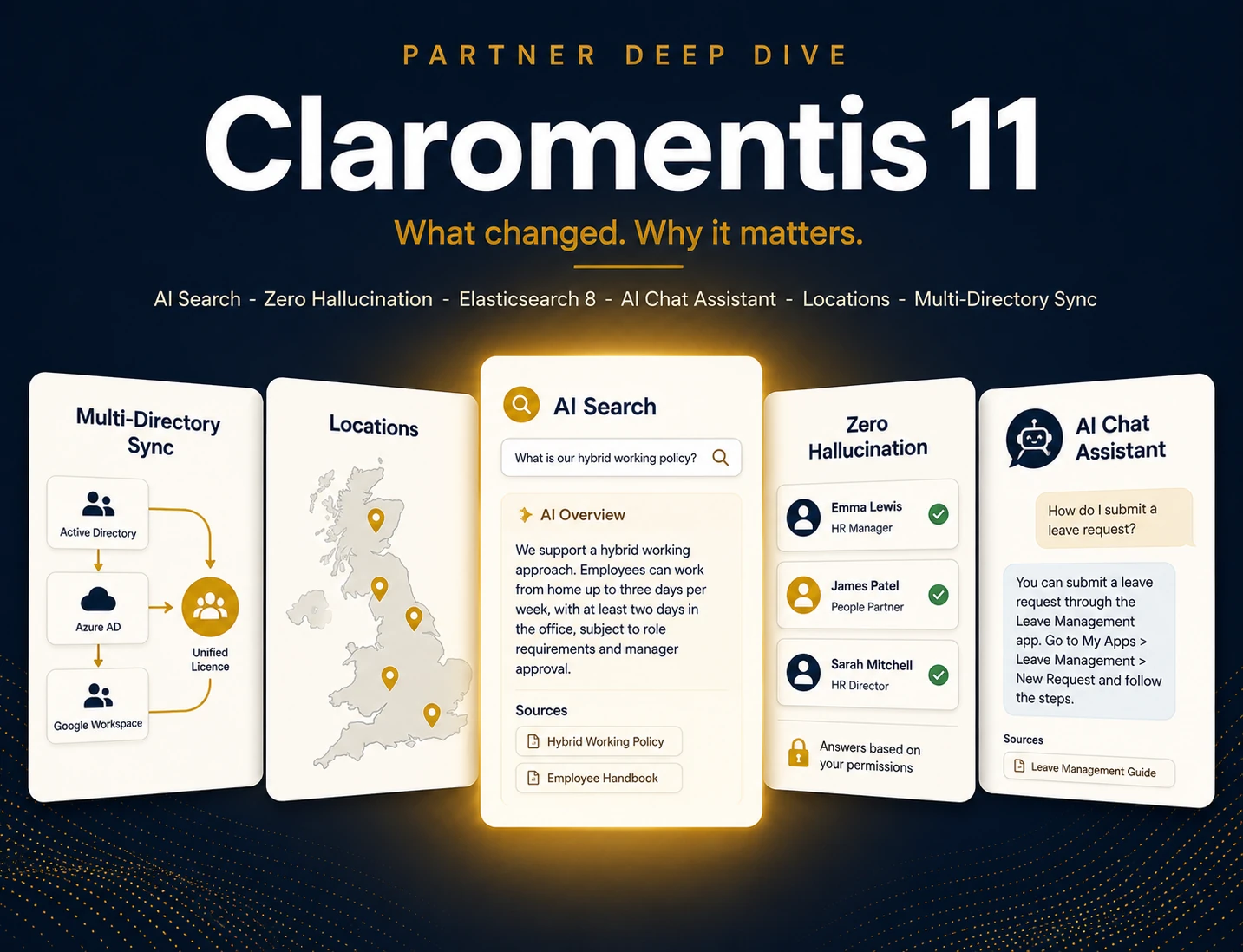
Claromentis 11 AI Search ingests information only from the customer’s own portal, eliminating fabricated answers. McKinsey Global Institute research found employees spend 1.8 hours every working day, or 9.3 hours a week, searching for information. AI Search is grounded against portal data only, returning a concise cited overview when confident and a ranked list of links when not.
Here’s how it behaves in practice. You type a question in plain English. AI Search understands the intent, so you don’t need the exact file name or keyword. When it’s confident, it returns a concise AI overview that summarises the answer. When it isn’t, it falls back to a ranked list of links. No invented policies, no made-up phone numbers.
Traditional keyword search didn’t disappear, either. Claromentis upgraded it to Elasticsearch 8 for fast, precise lookups of file titles, usernames and page names. You get both: semantic understanding when you want an answer, exact matching when you know what you’re after.
Why does grounding matter so much? Because a confidently wrong answer in an HR or compliance context isn’t a quirk. It’s a liability. An intranet assistant that can only cite your own approved content is one you can actually trust your staff to use.

If you’re still weighing intranet platforms, our Claromentis vs SharePoint for UK SMEs deep-dive shows how the two compare on search, cost and day-to-day usability.
Why do permission-aware search results matter?
In Claromentis 11, AI Search and the chat assistant both respect existing user permissions. Two users running the identical query receive different correctly-scoped results based on their access rights. An HR user sees confidential HR documents; a Finance user does not. This makes the platform deployable in regulated UK sectors like healthcare, finance and legal where compliance teams would otherwise block AI assistants.
What it looks like in practice
Picture it. Sarah in HR searches “redundancy policy” and gets the confidential draft she’s allowed to see. Tom in Finance runs the same words and gets only the published staff handbook. Neither sees the other’s restricted content. The AI never becomes a backdoor around the access controls you already set.
This is the detail most “AI for your intranet” pitches skip. Bolting a language model onto a document store is easy. Making sure that model can’t surface a salary spreadsheet to the wrong person is hard, and it’s exactly where a permission-aware design earns its keep.
Why it matters for regulated sectors
For regulated UK sectors (healthcare, finance, legal), this is the difference between a tool you can deploy and one your compliance team vetoes. Would you switch on an assistant that might quote a restricted file to whoever asks? Permission-aware results mean you never have to make that bet.

McKinsey’s foundational research puts knowledge workers at 19% of every working week, nearly a full day, spent searching for internal information (McKinsey, The Social Economy, 2012). AI Search exists to collapse that number, returning a sourced answer in seconds rather than a folder hunt that ends in a Slack message.
9.3 hrs/week lost to searching for information.
That’s 1.8 hours every working day. One day in five gone before anyone gets any real work done. AI Search exists to win that day back.
If you need the same permission model on your approvals and forms, our business process automation page shows how Claromentis builds permission-aware workflows on top of the same access control.
What is the AI Chat Assistant, and what is Claromentis Discover?
Claromentis 11 includes an AI Chat Assistant: a pop-up chat box inside the portal providing intelligent explanations and citations from the customer’s own content while respecting permissions. For administrators, the assistant can connect to Claromentis Discover, the official Claromentis customer support and knowledge portal, to answer product-level configuration questions inside the tool rather than via a support ticket.
The assistant has two jobs. For everyday staff, it answers “how do I book annual leave?” or “where’s the brand guideline?” using your portal. For administrators, it can connect to Claromentis Discover, the official Claromentis customer support and knowledge portal, to answer product-level questions about how to configure and run the platform itself.
That second part is genuinely useful. Discover is where Claromentis publishes its own help articles, release notes and how-to guides. Wiring the assistant into Discover means your admin team gets product support inside the tool, instead of opening a ticket and waiting. It’s help for the people who run the intranet, not just the people who use it.
If adoption is on your mind, our learning management system page shows how Claromentis pairs staff training with intranet content in one platform.
What does the Claromentis 11 Locations app do for multi-site organisations?
Locations is a new Claromentis 11 application providing a 360-degree view of every site in a multi-site organisation. The beta launched on 7 May 2026. Each site receives its own performance dashboard with site details, staff profiles, training-completion rates, NPS scores, financial data and policy-acceptance rates. Head office aggregates all dashboards into one view. Built for franchise networks and multi-site businesses.
What goes on a Locations dashboard? Site details and staff profiles, operational overviews and SOPs, internal communications, training-completion rates, NPS scores, sales and financial data, policy-acceptance rates, plus any custom operational metrics you define. Both franchisors and franchisees can access the view that’s relevant to them.
For a UK business running 7, 15 or 50 sites, this replaces the usual mess of spreadsheets, shared inboxes and quarterly PDF reports. A regional manager can compare NPS across branches on Monday morning instead of chasing each site for numbers. Consistency stops being a hope and becomes something you can actually see.

Here’s a side-by-side of how Claromentis 11’s AI-grounded approach compares with the keyword search most legacy intranets still rely on:
| Capability | Legacy keyword search | Claromentis 11 AI Search |
|---|---|---|
| Query style | Exact keywords required | Natural-language questions |
| Answer format | List of links | Concise overview + links |
| Data source | Your portal | Your portal only (no hallucination) |
| Permissions | Respected | Respected (per-user results) |
| Engine | Older index | Elasticsearch 8 + AI layer |
 Ask anything
Locations
Dashboard
Profile
Operational
Finance
Apps
Documents
People
Reports
Policy Acceptance
Training Records
Locations > Dashboard
Locations
NPS
Finance
A working model of the real Claromentis 11 Locations dashboard, checked against the product. The sites and figures are UK SME sample data. The revenue and NPS figures on this screen are entered against each site, not fed from an accounting system.
See your own sites on it, free for 30 daysHow does Multi-Directory Sync simplify M&A and multi-brand setups?
Claromentis 11 Multi-Directory Synchronisation allows multiple Azure AD tenants to be synced within a single Claromentis licence. This solves user-management problems for organisations growing through acquisition or running multiple distinct brands under one portfolio, eliminating the typical post-acquisition mess of separate intranets or weeks of manual user account reconciliation by IT teams.
Before, each Azure AD tenant typically meant its own silo. After an acquisition, you’d either run two intranets or spend weeks reconciling user accounts by hand. Multi-Directory Sync pulls those tenants into one portal automatically, so a newly acquired company’s staff appear in the directory without anyone rebuilding it.
For UK SMEs on a buy-and-build strategy, that’s real time saved. One licence, one platform, one place to find people and policies, even when the org chart spans three companies that were separate last quarter. The intranet keeps up with the corporate structure instead of lagging months behind it.
One platform: intranet, BPA and learning management
Claromentis 11 combines intranet, business process automation and learning management under one licence and one login. AI Search reads across all three modules, so a single query can surface a policy document, a workflow form and a training course at once. The platform has been hardened over 25 years of development, distinguishing it from newer AI-first startup products.
This is where the consolidation argument gets concrete. Many UK SMEs run a document store, a forms tool, a comms app, an LMS and a directory as five separate subscriptions. Each renews on its own date, breaks its own way and needs its own admin. One platform collapses that into a single contract and a single login.

The 25-year milestone matters here too. This isn’t a startup bolting AI onto a thin product to chase a funding round. It’s a mature platform, used by organisations worldwide, adding AI to foundations that have been hardened over two decades. For a business betting its internal operations on a tool, that track record is worth as much as any single feature.
If you want to see what one-platform pricing actually looks like, our modular Claromentis pricing page lays out what UK SMEs pay per user, per month.
Should UK SMEs upgrade to Claromentis 11?
For UK SMEs already on Claromentis, version 11 is a clear upgrade. New deployments typically go live in 6 to 8 weeks. The strongest cases are multi-site businesses, franchise networks and groups growing by acquisition, because the Locations app and Multi-Directory Sync features were built for those shapes. Heavily customised legacy versions need careful upgrade planning with a partner.
The strongest cases are multi-site businesses, franchise networks and groups growing by acquisition. Locations and Multi-Directory Sync were built for exactly those shapes. If you run one office of fifteen people, you’ll still benefit from AI Search; you just won’t lean on every new feature.
Should everyone rush? No. If you’ve heavily customised an older version, plan the upgrade properly and test your integrations first. That’s where a partner helps: we scope the migration, protect your customisations and get your team productive on the new features rather than just switching versions and hoping.
What we see in deployments: across the projects we run, the features that drive adoption fastest aren’t the flashiest. They’re AI Search and the permission model, because they remove daily friction for every user, on day one, without training.
Ready to see it? Try AI Search on a real portal and see permission-aware results for yourself. If that sounds useful, book your free 30-day Claromentis 11 demo and we’ll send you the sandbox link.