
TL;DR: The best questions to ask intranet vendors are the ones that force a specific answer: a named feature, a person, a week or a clause in the contract. Put the same 15 to every vendor, in writing, and judge the answers rather than the demo. None of the 21 ranking pages we read spells out, for each question, what a good answer sounds like.
I spent seven years on the buying side of an intranet. I ran Claromentis for more than 850 people across 20 countries, as the customer, so I’ve sat through the demos and read the contracts. Today I sell this intranet platform as the founder of Techspire IT, an Authorised Claromentis Partner. So this list ends with a request: ask us these too.
Before writing it, on 27 October 2026, I read the pages Google ranks first in the US for “questions to ask intranet vendors”. Apart from two forum threads, intranet vendors wrote every result on the first page. Google’s AI Overview cites the same kind of source: intranet vendors and agencies that build intranets. The lists are long, but they stop at the question. Not one of the 21 pages I could read says, question by question, what a good answer sounds like. Only one asks whether the AI respects who may see what, and only one says you should be able to take your data with you when the contract ends. This list covers all three.
Key Takeaways
- Ask every vendor the same questions, in writing, before you see a demo.
- A good answer is specific: a named feature, person, week or contract clause. A vague one deserves a second ask.
- Ask whether the AI answers only from what each person may open. Only 1 of the 21 ranking pages we read asks it.
- Get a written quote that lists everything in year one, not just a price per user.
- Agree how you’d get your data back before you sign, not when you leave.
Interactive: Ask the vendor
Pick a vendor, then mark each answer as you get it. Press the chosen vendor to rename it. Nothing is sent anywhere.
How do you use a list of questions to ask intranet vendors?
Questions to ask intranet vendors are the same written questions you send to every vendor on your shortlist before any demo. Then you compare the answers side by side. A list of questions to ask intranet vendors only helps if every vendor answers the same thing.
- Pick the questions that matter to you. Not all 15 will. A firm with no frontline staff can skip question 5.
- Send them in writing first. Written answers are easier to compare, and harder to soften later.
- Ask every vendor the same ones. Otherwise you’re comparing a sales pitch with a set of answers.
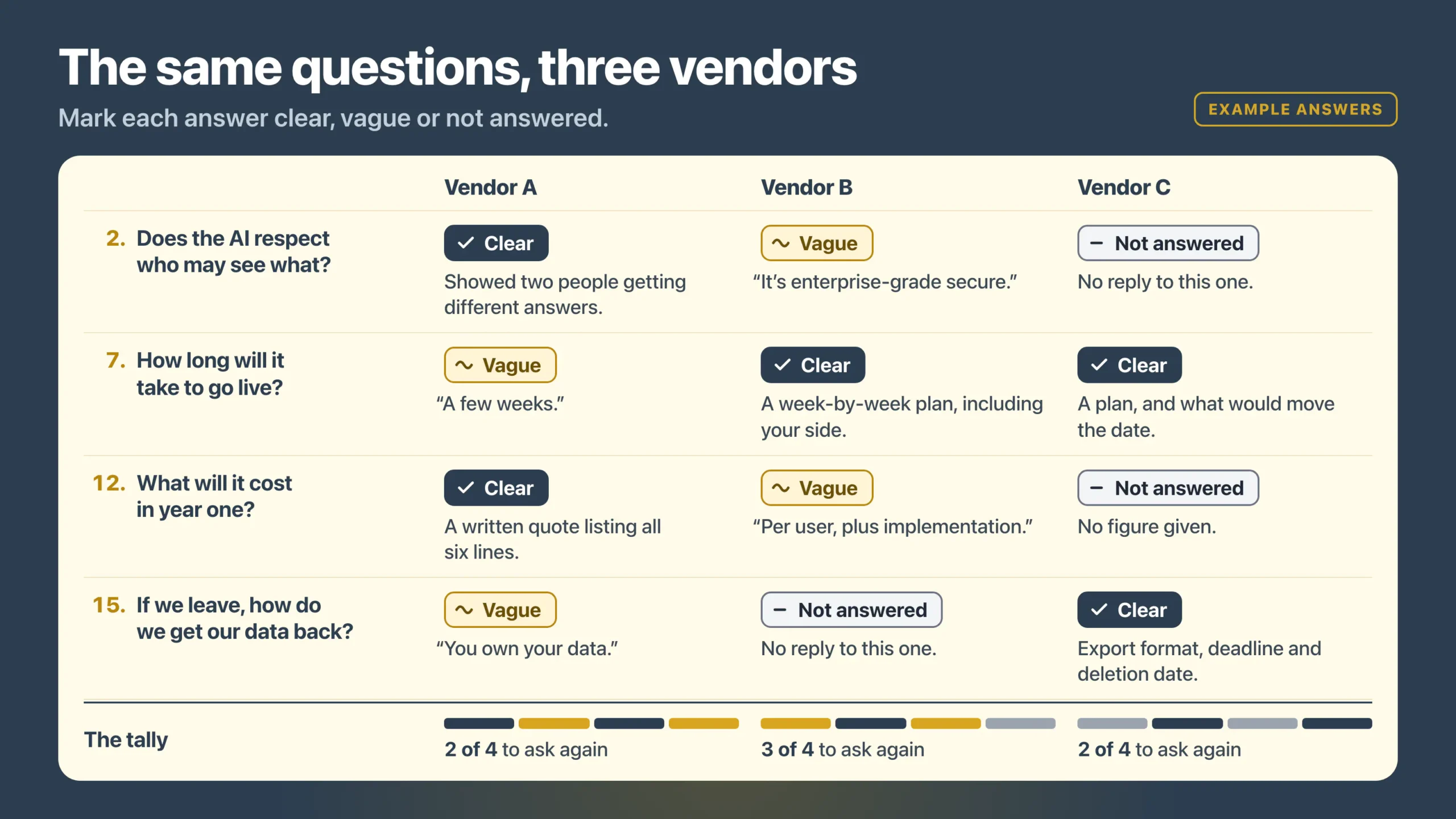
- Mark each answer clear, vague or not answered. A vague answer isn’t always a no, but it’s a question to ask again.
- Ask them to show you, not tell you. Where a trial makes it possible, check the answer working.
The Ask the vendor sheet above does the marking for you. Each question below comes with why it matters, what a good answer sounds like, a vague answer to be wary of, and how Claromentis answers it, as a worked example.
The 15 questions at a glance
| Ask about | A good answer names |
|---|---|
| 1. What the AI answers from | Your own content as the source, shown under every answer, and an off switch |
| 2. Who may see what | Answers only from what that person may open |
| 3. Forms and approvals | One of your real forms, built in the trial, and what more costs |
| 4. Microsoft 365 and sign-in | The sign-in it supports, how accounts stay in step, and any extra cost |
| 5. Staff with no company email | How they get an account, tested on a real phone |
| 6. Who implements it | The company that configures, migrates and trains |
| 7. Time to go live | A week-by-week plan, what your side does, and what moves the date |
| 8. Moving your content | What to move, archive or delete, with the move in the quote |
| 9. Training | Who trains each group, how, and what the price includes |
| 10. Who runs it day to day | A week in your administrator’s life |
| 11. After launch | Support hours, response times and a named contact, in the contract |
| 12. Cost | A written year-one quote: licence, setup, migration, connections, training, support |
| 13. A trial | Your own environment for weeks, with your content, that your staff log into |
| 14. Where your data lives | Hosting provider, regions, certificate, auditor, and where the AI runs |
| 15. Leaving | What you can export, in what format, by when, at what cost, and the deletion date |
What should you ask intranet vendors about AI search?
Two of the questions to ask intranet vendors are about AI: what it answers from, and whether it respects who may see what. Only one of the 21 pages I read touches the second.
1. Does it have AI search, and what does the AI answer from?
Many intranets now claim some AI. What matters is what it reads. An assistant that answers from the open web, or from a model’s general knowledge, can give your staff confident answers that aren’t your policy.
A good answer: it names the source, your own intranet content. It shows the page or document under every answer, and lets an administrator switch the AI off.
Be wary of: “it uses the latest AI models”, with nothing about what it reads or how staff can check an answer.
In Claromentis: AI Search, AI Overview and the AI Assistant come with the Intranet licence. They answer from your own intranet content, plus Claromentis’s help centre for how-to questions about the platform. The overview also cites the content it drew on, and administrators can turn any AI feature off (Claromentis AI Search page). How that works, and how it compares with a separate AI tool, is on our enterprise RAG page.
2. Does the AI respect who may see what?
Respecting who may see what means the AI answers only from what the person asking may open. But almost nobody asks about it. If you’ve locked your HR folder but the AI can still read it, the AI can summarise a salary review for anyone who asks the right question.
A good answer: the AI only answers from what that person may open. Better still, the vendor shows you: two people ask the same question and get different answers.
Be wary of: “it’s enterprise-grade secure”, or an answer about encryption when you asked about permissions. Those are different questions.
In Claromentis: Claromentis says its AI search and overviews work with the intranet’s permissions. So every result reflects a person’s role, location or team and the access you’ve given them (Claromentis AI Search page). Its own FAQ gives the test: if someone can’t open a document, folder or page, they won’t see it in any AI search result. It follows the permissions you set. That’s why we review them with you before you switch any AI on.
What should you ask intranet vendors about the everyday jobs?
The next questions to ask intranet vendors cover the jobs you’d use it for in the first month: forms, sign-in and the staff who aren’t at a desk. That’s where an intranet earns its place, or doesn’t.
3. Can it handle our forms and approvals?
Equipment requests, new starter checklists and purchase approvals: if these still travel by email, they’re probably part of why you’re buying. So ask whether the vendor does them in the product, or hands you to a separate tool.
A good answer: they build one of your real forms, with its approval steps, during the trial, and tell you what it costs to add more.
Be wary of: “yes, it integrates with everything”, without a single form shown working.
In Claromentis: forms and approvals come from Business Process Automation, an add-on to the intranet. Your quote can include it from the start, or you can begin with the intranet and add it when a process is ready. Leave requests, expense claims and policy sign-off have their own Claromentis applications instead.
4. Does it work with Microsoft 365 and our sign-in?
Many organisations already run email, files and chat in Microsoft 365 or Google Workspace. The intranet has to sit alongside them, not hand staff another password.
A good answer: it names the sign-in it supports, explains how accounts stay in step with your directory, and says whether either costs extra.
Be wary of: “it works with Microsoft”, with no detail on sign-in, files or Teams.
In Claromentis: people can sign in with their Microsoft Entra ID account or through Okta. You can link files in OneDrive or Google Drive, so the same search finds them, and new news articles can post to a Microsoft Teams channel (core Claromentis intranet applications). Single sign-on needs Claromentis’s login handler module, which has a cost. To keep accounts in step with your directory, there’s a free LDAP tool and a paid User Sync module for Entra ID, Okta or a CSV file. So we price what you need before you commit. Still deciding whether you need an intranet next to Microsoft 365 at all? Our guide to an intranet alongside Microsoft 365 answers that first.
5. Can staff with no company email use it, on a phone?
Warehouse, site and shop-floor staff often have no company mailbox and no desk. But they’re the people who most need the news and the policies.
A good answer: it explains how someone with no company email gets an account and signs in, from which device, and lets you test that on a real phone.
Be wary of: “there’s a mobile app”, with nothing on how a frontline worker actually gets in.
In Claromentis: every account needs an email address today, but it can be a personal one, so staff without a company mailbox still get their own login. There’s a free Claromentis app for Android and Apple (core intranet applications). A branded app with your own logo is available at extra cost. You can also try signing in from a phone’s browser during the trial. Our guide to employee self-service explains why this gap matters.
What should you ask intranet vendors about getting it live?
Much of the risk in an intranet project sits in the setup, not the software. These four questions to ask intranet vendors show whether they’ve planned yours, or only sold it.
6. Who implements it: the intranet vendor or a partner?
Some intranet vendors don’t set up your intranet themselves; a partner does. That’s fine, but you need to know who you’re dealing with on day one and in year two.
A good answer: it names the company that will configure, migrate and train. It says whether the vendor has authorised them, and who you call when something breaks.
Be wary of: “our team will handle it”, with no name and no say in who that is.
In Claromentis: Techspire IT is an Authorised Claromentis Partner. We set it up, move your content and train your administrators. If you choose our support, it starts at go-live, and you get one bill for the licence and the support.
7. How long will it take to go live?
A date on its own tells you little. What you need is the plan, and especially the part of it that falls on your own people.
A good answer: a week-by-week plan that names what your side does each week (content, decisions, sign-off) and what would move the date.
Be wary of: “a few weeks”, or a firm date given before anyone has asked how much content you have.
In Claromentis: plan on 6 to 8 weeks from the agreed scope to go-live. A large migration, several connected systems or custom work can take longer.
8. How do we move our existing content in?
Shared drives and old intranets are full of files nobody owns. Move all of it and you move the mess.
A good answer: they ask what you have and how much. They help you decide what to move, archive or delete, then put the move in the quote as a fixed scope.
Be wary of: “we can import anything”, which usually means you’ll do the sorting yourself.
In Claromentis: moving your content is a line in our written quote, with a fixed scope agreed before work starts. So moving a shared drive or an old intranet doesn’t turn into a surprise cost later.
9. Who trains our people, and how?
There are three groups to train: the administrators who run it, the people who own content, and everyone else. So a vendor who only talks about one group is planning for one group.
A good answer: it says who trains each group, how (live or recorded), and what the price includes.
Be wary of: “it’s so easy nobody needs training”. Someone always does, starting with the person who has to run it.
In Claromentis: live training for your administrators is part of our fixed scope. If you also want to run your own courses and compliance training on the intranet, the Learning Management System is an add-on.
What should you ask intranet vendors about life after launch?
Launch day is the start, not the finish. Here the questions to ask intranet vendors are who keeps it running, and what happens when something goes wrong or people stop using it.
10. Who will run it day to day, and how technical do they need to be?
An intranet stays current only if the person looking after it finds it easy to run. So the product has to suit whoever it really lands with. Our comparison of seven intranet platforms explains why that matters more than the feature list.
A good answer: it describes your administrator’s week, such as publishing news, updating a policy or adding a new starter, and how long it takes to learn.
Be wary of: “anyone can use it”, from someone who has used it every day for years.
In Claromentis: in my seven years running it, the day-to-day admin was usually someone in HR or operations, not a developer. That’s who we train, live, as part of the setup.
11. What happens after launch?
The first months decide whether staff keep coming back. Ask what support you get, and who helps if people drift away.
A good answer: support hours and response times written into the contract, a named contact, and a plan for the first months after go-live.
Be wary of: “we’re always here for you”, with no hours, no response times and nothing in writing.
In Claromentis: every client has Claromentis’s Discover support portal at no extra cost. Support hours and response times are set out in your contract, and our own support, if you choose it, starts at go-live. Our guide to intranet adoption covers what decides whether people keep using it.
What should you ask intranet vendors about cost and a trial?
Two questions to ask intranet vendors tell you whether the number they show you is the number you’ll pay, and whether you’ve seen the product working before you commit.
12. What will it actually cost, in year one and after?
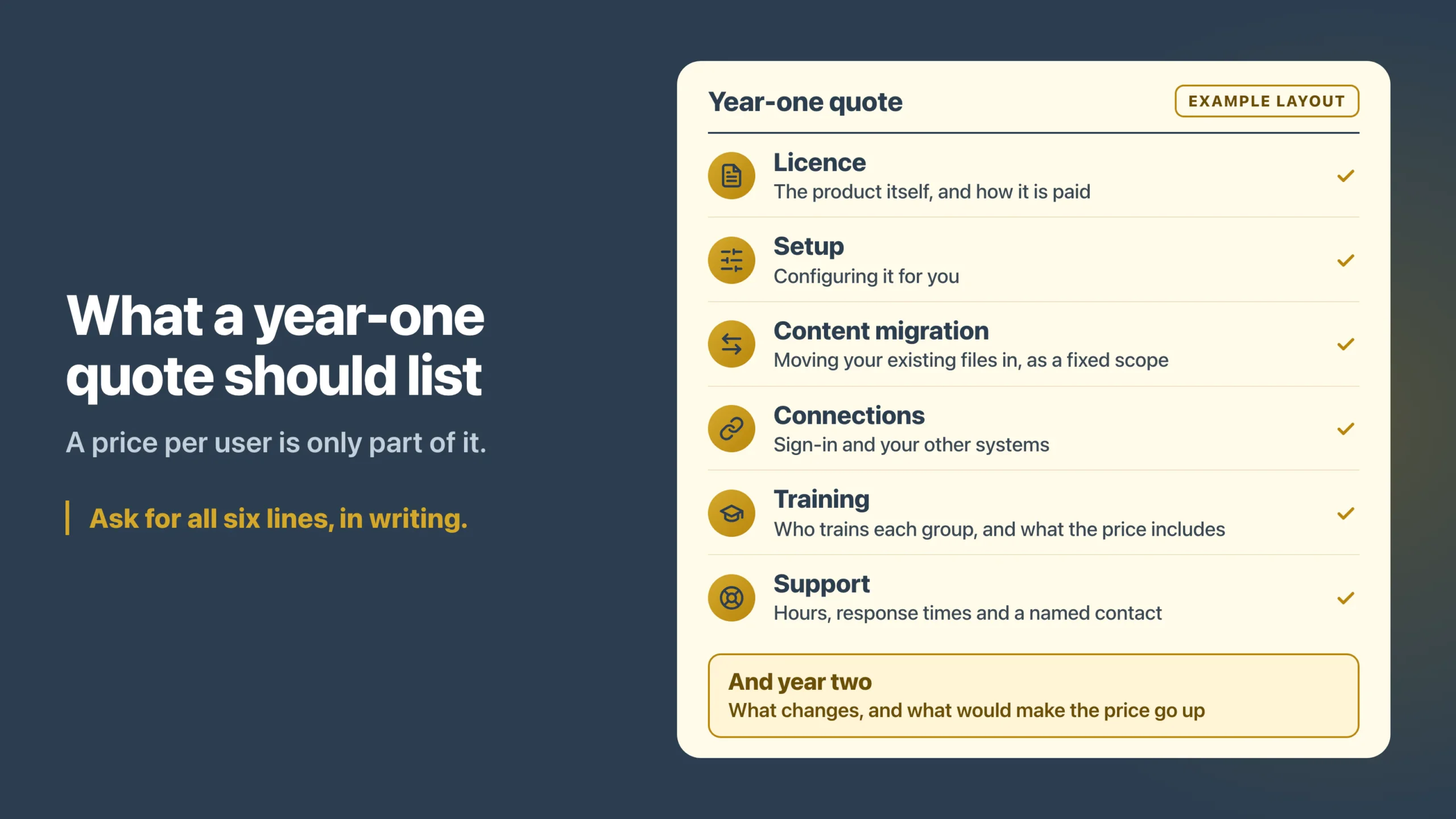
A price per user is only part of it. Setup, moving content, connecting systems and training all add to it, and some quotes leave them out.
A good answer: a written quote that lists everything in year one: licence, setup, migration, connections, training and support. It also says what changes in year two, and what would make the price go up.
Be wary of: a per-user figure with “plus implementation” next to it and no number.
In Claromentis: we don’t publish a price, because it depends on your scope. What moves it is how many people use it, how much content you’re moving, how many workflows and courses we set up, which systems we connect and how much training you need. The licence is yearly, and you can pay it monthly, quarterly, half-yearly or yearly. You get a written quote with a fixed scope before you commit.
13. Can we test it first?
A demo shows you the product at its best, run by someone who knows it well. But a trial is a working environment of your own, and it shows you what your own people make of it.
A good answer: a working environment of your own for a few weeks, with your content in it, that your staff log into themselves.
Be wary of: a one-hour guided demo offered as the trial.
In Claromentis: we set up a 30-day Claromentis portal, branded for you, that your team logs into themselves. You’ll hear back from me within 24 hours, and there’s no credit card to enter.
What should you ask intranet vendors about your data?
The last questions to ask intranet vendors are about your data: where it lives while you’re a customer, and how you get it back if you stop being one. Both answers belong in writing before you sign.
14. Where will our data live, and what is the vendor certified for?
“In the cloud” isn’t an answer. If you work in a regulated sector, or your customers ask, you’ll need the region and the certificate.
A good answer: it names the hosting provider, the regions you can choose from, the security certification and who audits it, and where any AI processing runs.
Be wary of: “we’re fully GDPR compliant”, with no region, no certificate and no list of who else handles your data.
In Claromentis: it runs on Google Cloud, and you choose London, Frankfurt or South Carolina. Claromentis holds ISO 27001:2022, with annual external audits by the British Assessment Bureau. For the optional AI features, requests run in the EU for UK-hosted and EU-hosted customers, and in the US for US-hosted ones. Your core data and records remain hosted in the region you chose (security, privacy and data processing terms).
15. If we leave, how do we get our data back?
Nobody plans to leave at the start, which is exactly why it’s the right time to ask. Before you sign, a vendor has every reason to give you a clear answer. Afterwards, it has less.
A good answer: what you can export and in what format, how long you have to do it, whether it costs anything, and when they delete your data. All of it in writing. Under UK GDPR, a contract with a vendor that handles personal data for you must also cover the end of the contract. The vendor either deletes that data or returns it, at your choice (ICO guidance on contract terms).
Be wary of: “you own your data”, with no export and no date.
In Claromentis: Claromentis’s published terms say it permanently deletes customer data 30 days after a contract ends. On termination, Claromentis returns the customer’s data in an industry open format such as XML or SQL. Its customer agreement also says it does so within 15 days of the customer’s request, at its standard day rate. Its data processing terms let you direct, in writing, whether it returns or deletes your personal data. Ask for the day rate and the steps to request the export in writing before you sign. Then agree the export before your last day, not after it.
Frequently asked questions
What questions should you ask a software vendor before you buy?
Ask what it does for the jobs you’ll use it for, who sets it up, and how long that takes. Then ask what it costs in year one and after, where it keeps your data, and how you’d leave. For an intranet, add one more: does its AI respect who may see what?
What is a red flag when you're buying an intranet?
A general answer to a specific question. “It’s secure” when you asked about permissions, “a few weeks” when you asked for the plan, or a price with “plus implementation” and no number. Ask once more. If the answer is still vague, write that down and compare.
Should we send these questions before the demo?
Yes. Written answers are easier to compare and harder to soften later. Send the same list to each vendor and ask for answers in writing first. Then use the demo, or better a trial, to see those answers working.
Do we need a formal RFP to buy an intranet?
Not always. A smaller organisation can get most of the value from a short list of questions it sends to two or three vendors. A formal request for proposal makes sense when your procurement rules require one, or when several departments must agree.
Will Techspire IT answer these questions too?
Yes, and we’d rather you asked. We sell Claromentis, so weigh our answers with that in mind. Ask us the same questions you ask everyone else, in writing, then test our answers in a 30-day portal before you decide.
The bottom line on questions for intranet vendors
The answers are the hard part. A good one is specific enough to check: a named feature, a person, a week or a clause in the contract. A vague one deserves a second ask. So ask the intranet vendors on your shortlist the same questions, mark the answers, and choose the one whose answers you could hold them to. If you’re still comparing platforms, our comparison of seven intranets is the place to start.
Ask us the same 15 questions. We’ll answer them in writing, then set up a free 30-day Claromentis portal so you can check the answers yourself. If it doesn’t fit, we’ll say so.